Changelog

New features and fixes in TurnShift.

  1. The new calendar, dark mode, and your AI assistant

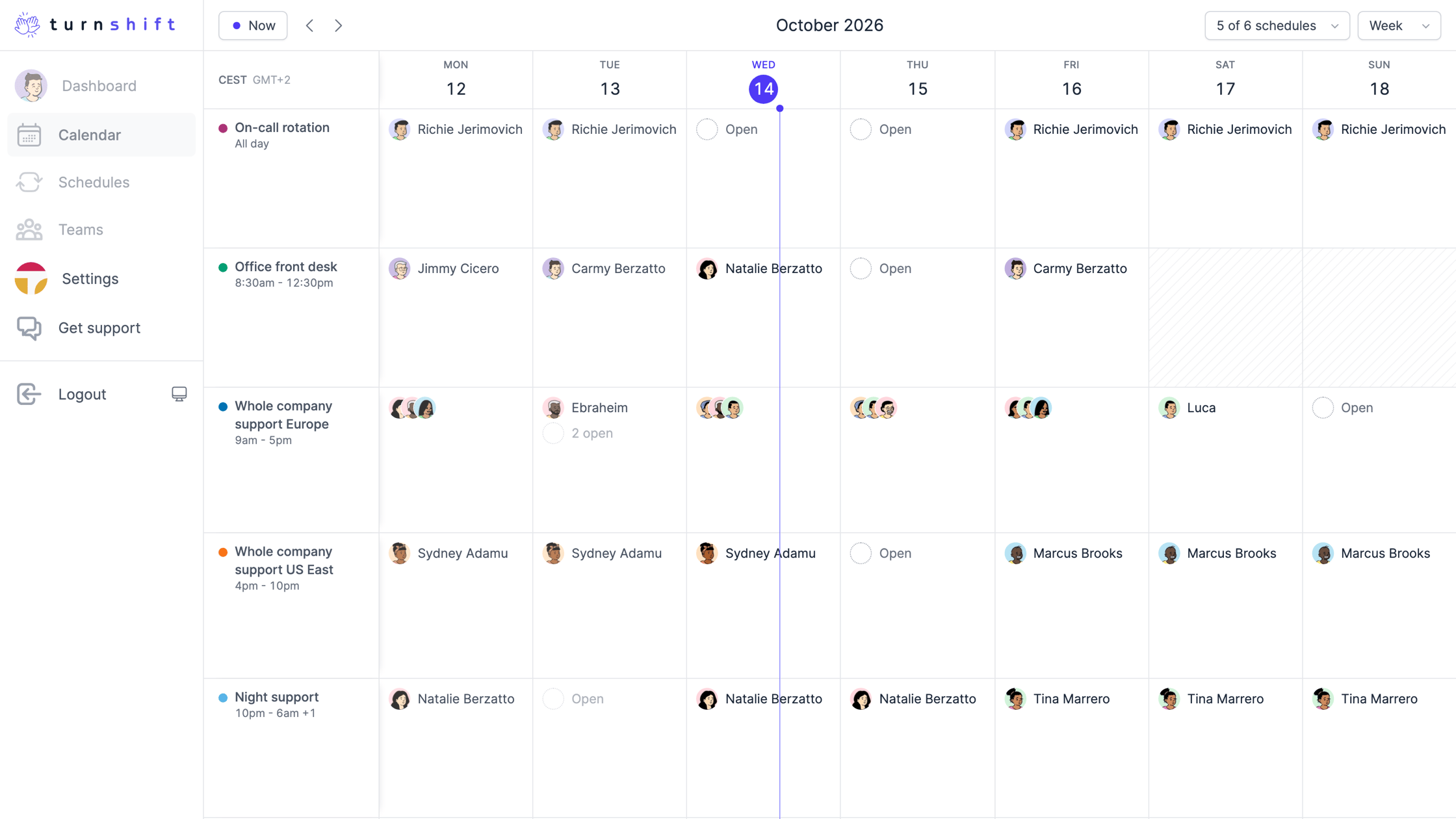
    A new calendar for your whole team

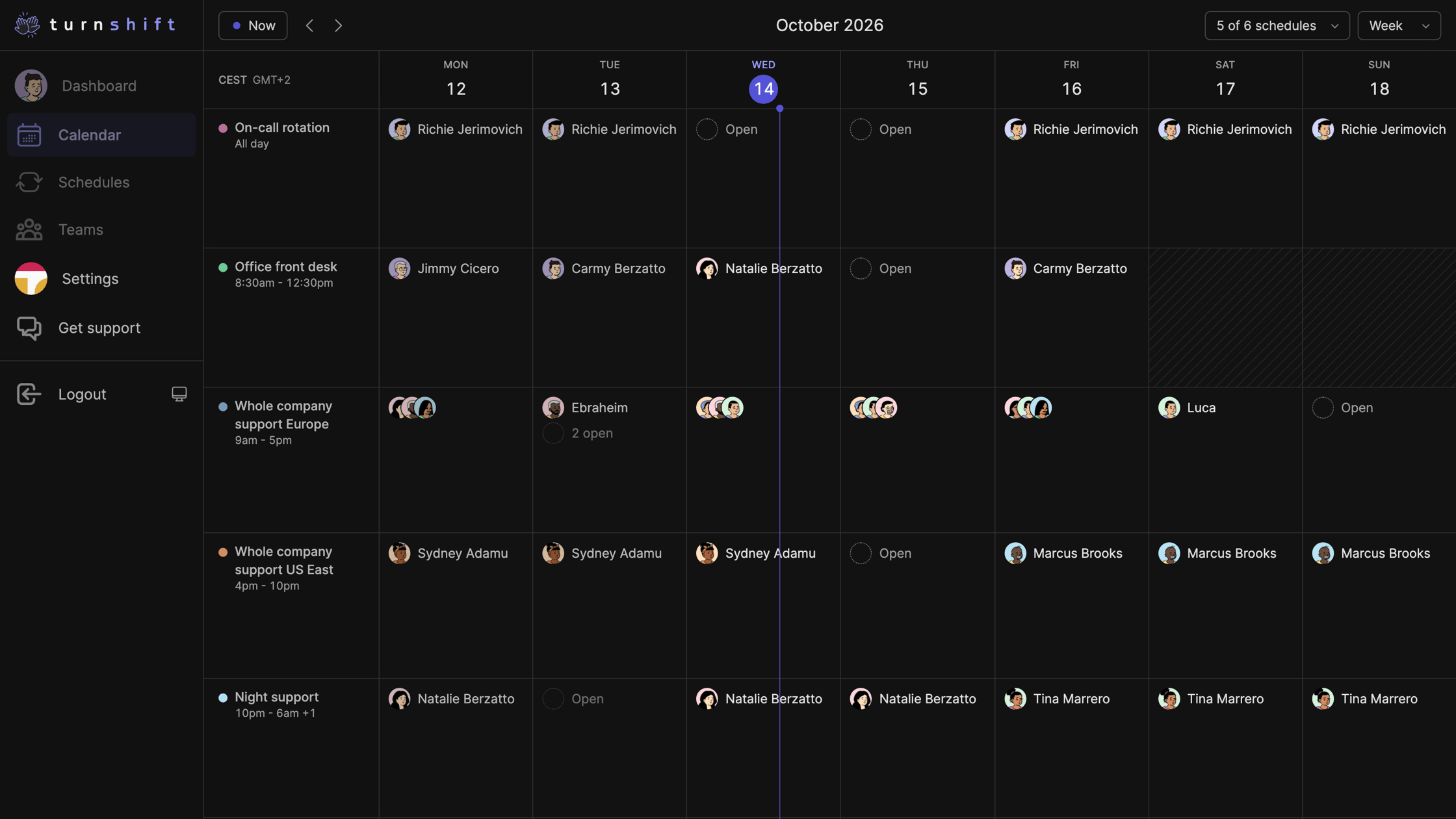
    The calendar's Timeline, one row per schedule

    The calendar is out of beta. Each schedule gets its own row, so you see who is on this week and which days are still open. Zoom into a day and a line shows who is on right now.

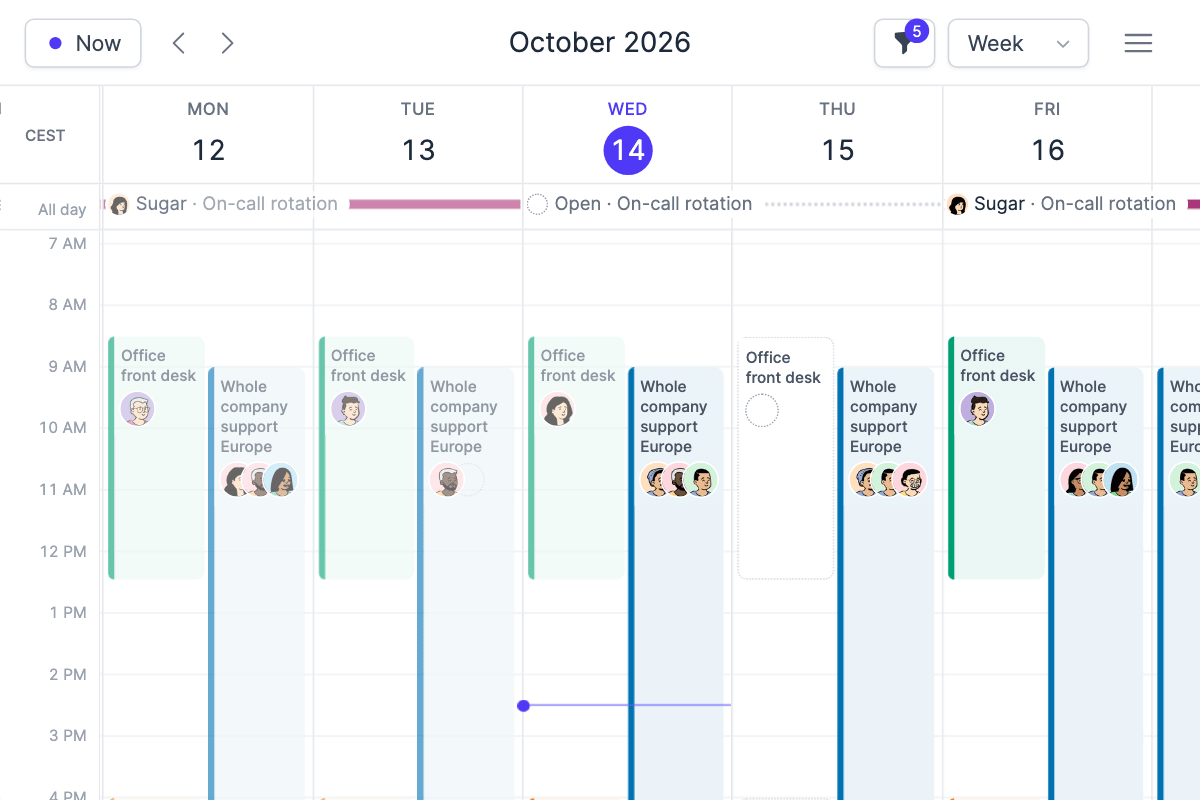
    The calendar's week view, like Google Calendar

    Prefer Google Calendar? Pick Day, Week or Month in the view menu, and hide the schedules you don't need with the filter.

    Also new:

    • Assign many days at once. Drag across days on a schedule, then assign, unassign or auto-assign. Undo if you change your mind.
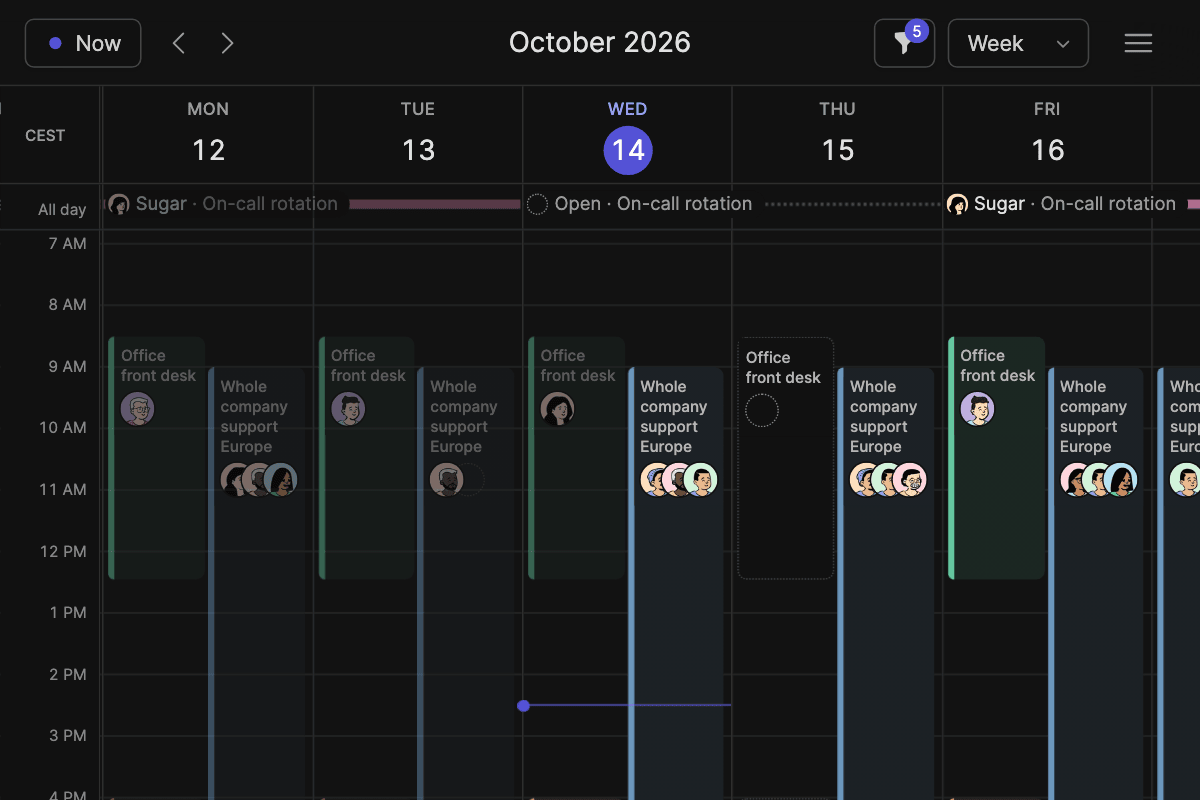
    • Dark mode. Click the button next to Logout, or press Shift+D.
    • Connect your AI assistant. ChatGPT, Claude, Cursor and others can read and change schedules with your rights. Setup is in Settings, API.
    • Who is on shift now shows on your dashboard and in the TurnShift Slack app.
    • Add a note to shift start messages in the schedule's notification settings.
    • Mute TurnShift direct messages from the dashboard or Slack. Channel messages keep posting.
    • People search forgives typos and missing accents.
    • Pick a time zone in the calendar's top left corner.
    • Better on phones, and faster pages everywhere.
    • Follow this changelog in your feed reader with RSS, or ask your AI assistant "what's new in TurnShift?"
  2. Roles are here

    Until now anyone in your organization could edit anything: create schedules, assign colleagues, change billing. Now everyone has a role.

    • Admin: everything a manager can do, plus changing people's roles.
    • Manager: create and edit schedules, assign anyone, and manage teams, Slack, billing and the API token.
    • Member: book their own shifts.

    Nothing changes for your team today. Everyone in your organization is an admin, and every existing schedule stays open, so anyone can still book and change it. Move people to manager or member whenever you want, in Settings, Users.

    Want a schedule where only managers assign people? Turn off Open schedule in that schedule's settings. Members can still book themselves, they just cannot assign anyone else.

    You can also read and set roles over the API. The token is admin level and only admins and managers can see it: API documentation.

  3. API

    TurnShift now has an API, so you can list teams, users, shifts and add or remove bookings more easily. You can access the API in the Settings page and you can find a full documentation here: https://turnshift.app/docs/api

    Feel free to send us feedback on the API and ask for any changes to its format and features. Thanks!

  4. Unlimited early scheduling + A new date switcher

    Hi there, we just released a new feature: Unlimited early scheduling.

    Initially, TurnShift was built with this concept: do not allow folks to book more than one month in advance. As weird as this seems, yes, this was the default setting.

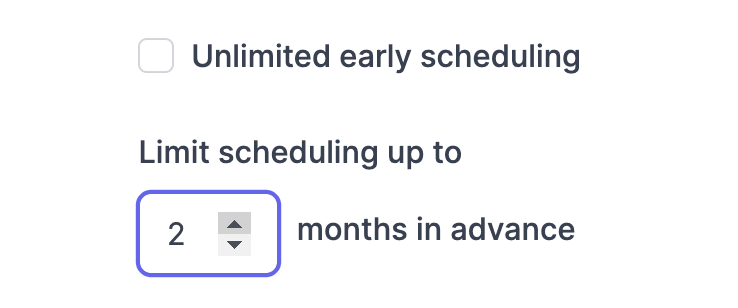
    Now the default setting will be "Unlimited early scheduling," and if you want to limit scheduling up to X months in advance, then you can also do that.

    These settings can be configured on the schedule's settings page.

    Unlimited early scheduling setting

    Or

    Limiting scheduling to a number of months ahead

    We also upgraded the weird month switcher from the schedule's pages to the modern one from the calendar. So enjoy and have a lovely weekend!

    PS: We're always making TurnShift better over time. If you encounter bugs or issues, use the chatbox on the left. Thanks!

  5. Multiple notifications fixes

    Hi there, we fixed a bug where you would receive multiple notifications for next-day bookings.

    If you still have the issue, do use the support chat in the app.

    Thanks!

  6. Support and team edition fixes

    Howdy, two quick fixes we made:

    1. You could not edit team names up until now. A major mistake from our developer, they will be punished.
    2. The support chat bubble was acting weirdly since the addition of the (beta) calendar feature. We also fixed that. The person responsible for this will have to write a thousand times "Customer is king" (on paper).

    Happy team scheduling!

  7. Sync Multi and Single Channel Guests

    🎊Happy new year!

    We added a feature to allow Slack's Multi and Single Channel Guests syncing.

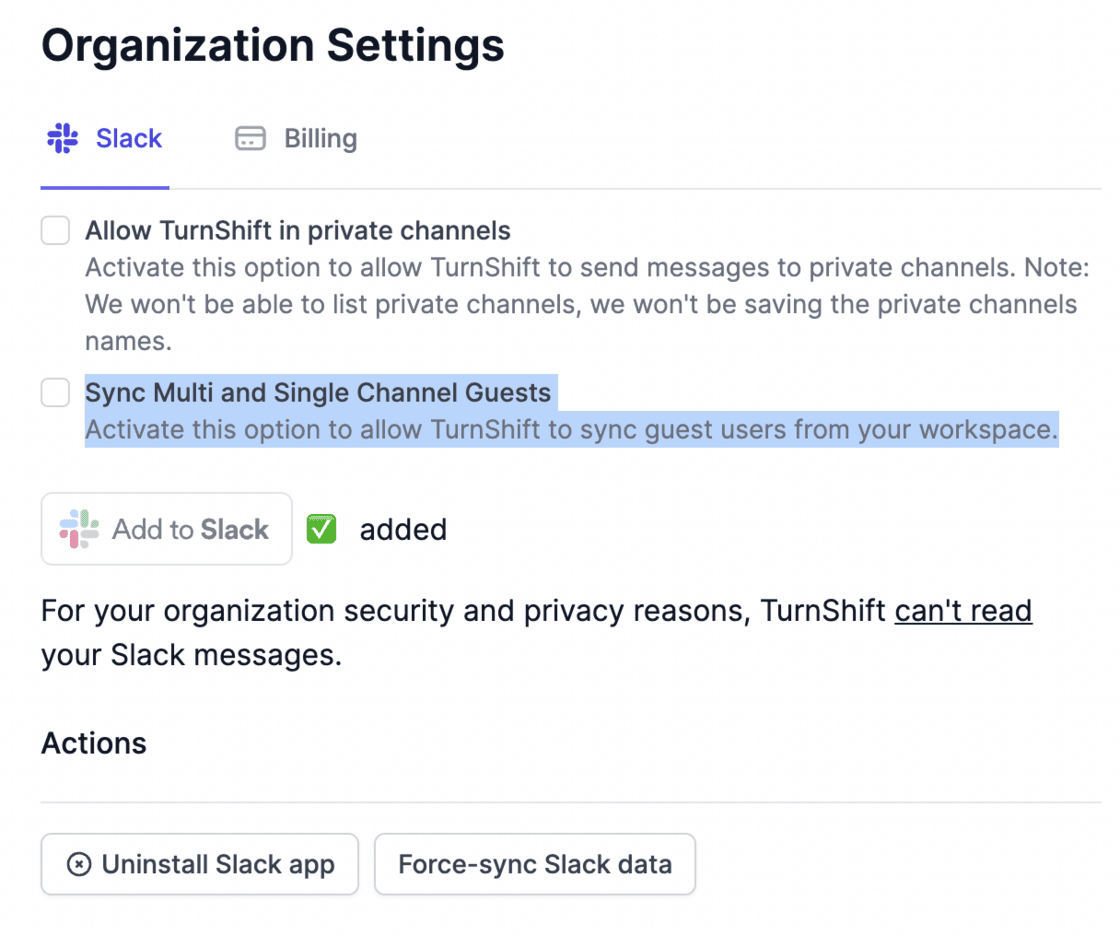
    You can find the option in your organization's Slack settings here:

    Option to sync Slack guests in the Slack settings

    Activate it, and 🪄poof it's done. Guest users are automatically synced and available for your teams.

    Enjoy!

  8. Private channels and a brand new multi calendar in beta

    WADUP scheduling fans?

    A brand new multi-calendar view

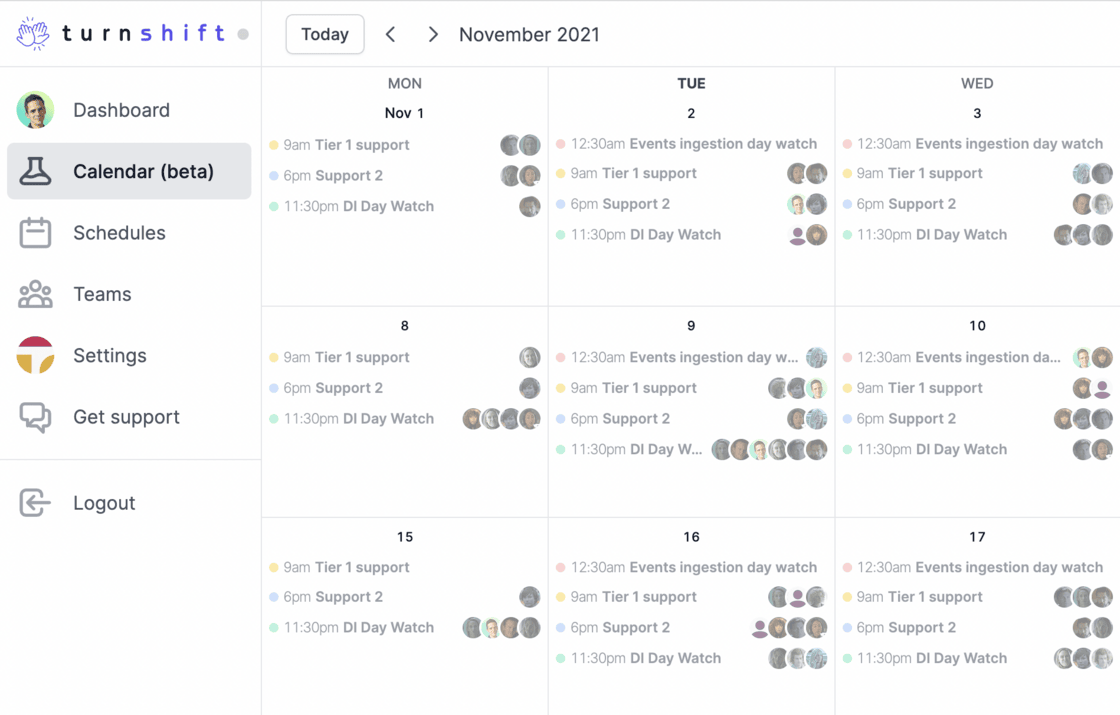
    Today we released a brand new multi-calendar view that looks like this:

    The multi-calendar view in beta

    🧪The feature is behind a flag, so if you want to access it, just let me know via the support bubble, and I'll give it to you immediately.

    This new calendar feature is a clone of Google Calendar, a UI I like, but for team scheduling. Right now, it serves as a view-only mode for all the shifts you created, but very soon, this will be the unique way to interact with TurnShift. You'll be able to create events and book them directly from this multi-calendar view.

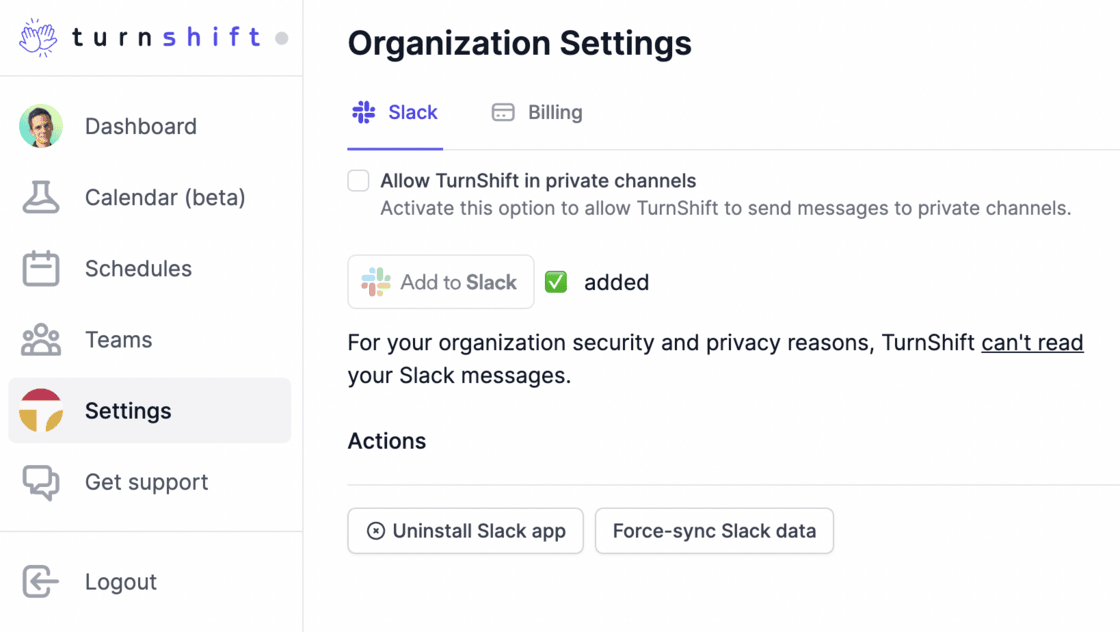
    Private channels, with no security changes

    We also released a way to send notifications and change topics on private channels. Our syncing mechanism is still 100% secure as:

    • We can't list all your private channels
    • We can only access the private channels you will add TurnShift to
    • We never store the names of the channels (private or public)

    The "Allow TurnShift in private channels" option in the Slack settings

    If you have any questions then use the support menu on the left.

    Best, Vincent.

  9. Custom Slack topics and new notifications features

    👋, here's what we released today:

    Customize channels topics

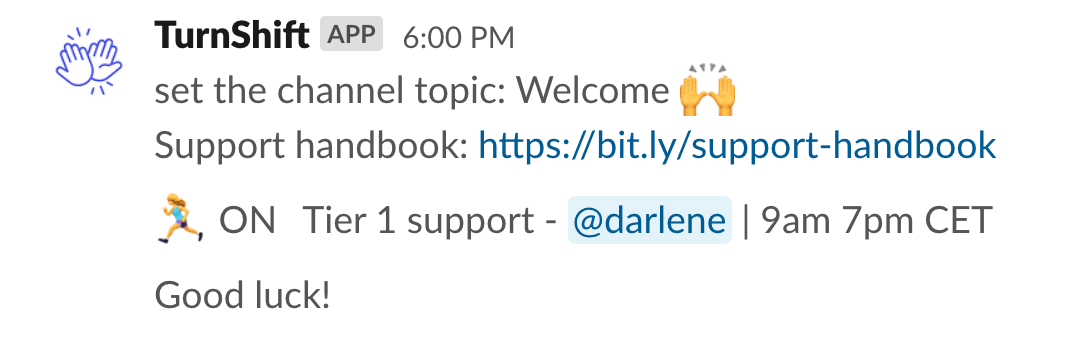
    You can now add text before/after the TurnShift topic status. This is useful when you're using the channel topics to point to various resources like a Support handbook for employees.

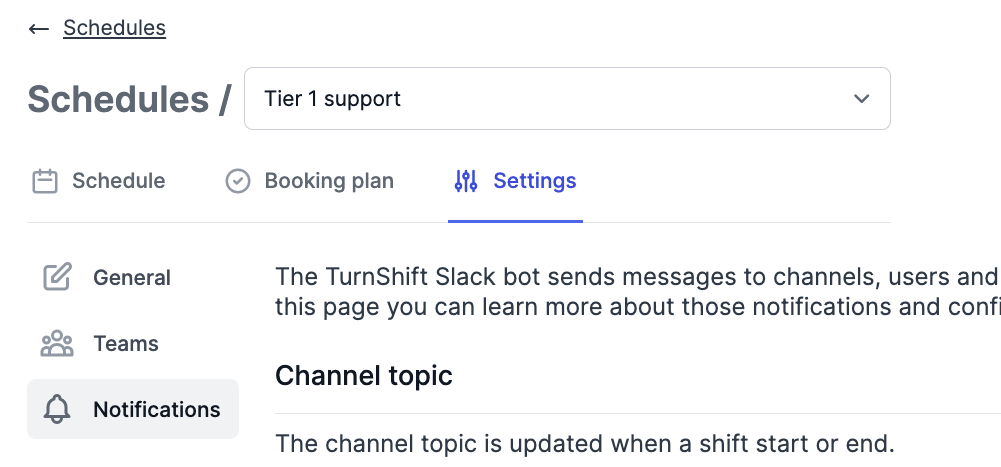
    Go to schedules > settings > notifications 👇

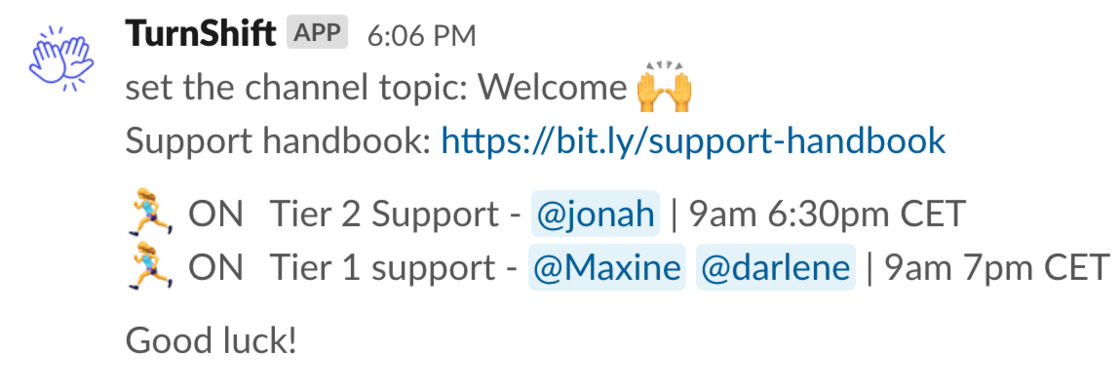
    And here's the resulting topic:

    The resulting channel topic in Slack

    Channel topics & multiple shifts

    We now support multiple shifts linked to the same channel when updating the topic. We merge their status into a single concise channel topic. Here's how it looks:

    One channel topic for two schedules

    Tip: Be sure to set the same channel topic for all shifts linked to the same channel.

    New notifications panel and settings

    Since Slack notifications are more and more customizable, we created a dedicated tab for them and took the opportunity to put all schedules settings in the same place.

    The schedule notifications settings

    There are also new granular notifications settings:

    • enable/disable sending a direct message when a shift start (default to true)
    • enable/disable sending a direct message to people when someone else assigns them a shift or cancels one of their shift (default to true)
    • enable/disable sending a direct message when people have shifts for the next day (default to true)
    • enable/disable sending a direct message to people with their next week shifts (default to true)

    We also took the opportunity to better explain when are those notifications sent.

    Other changes

    • We now update channel topics if you book/unbook a shift for the current day. So the topic is always up-to-date.
    • We fixed a bug around the detection of shift's running statuses when the shift timezone was already in the next day.
    • We fixed a bug where deprecated time zone names (coming from Slack) were not taken into account. We use https://github.com/vvo/tzdb and this was fixed here now.
    • We fixed a bug around detecting the number of shifts to book per schedule when you're a member of multiple schedules
  10. Find your next shift in Slack

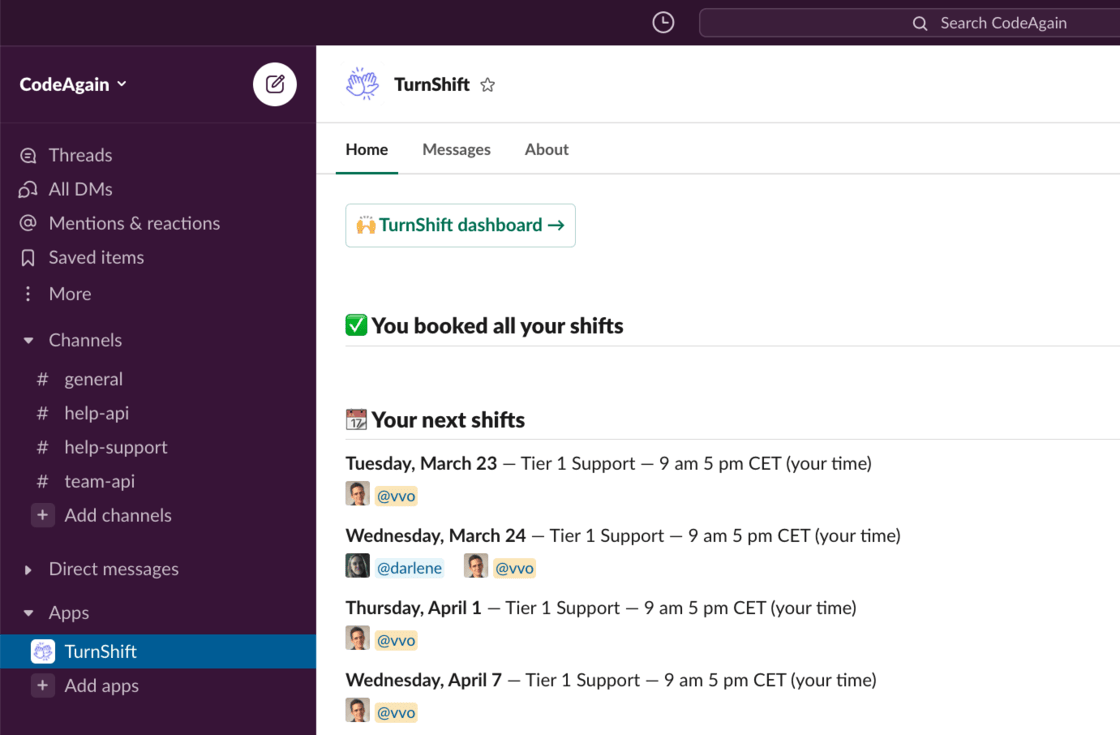
    We just released a new Slack home for the TurnShift Slack application. It allows you to access your TurnShift data without leaving Slack. Super handy to quickly check the current active schedules and their assignees, your next shifts, or if you have shifts to book.

    The TurnShift home tab in Slack

    To access it, just go to the "TurnShift" conversation (CMD/CTRL + K then "turnshift")

    Hope you like it!

  11. Choose a billing email and language

    Hey there! You can now choose to which email TurnShift receipts should be sent along with the language you want them in.

    Voilà des factures en Français !

  12. Disable shift start / end channel messages

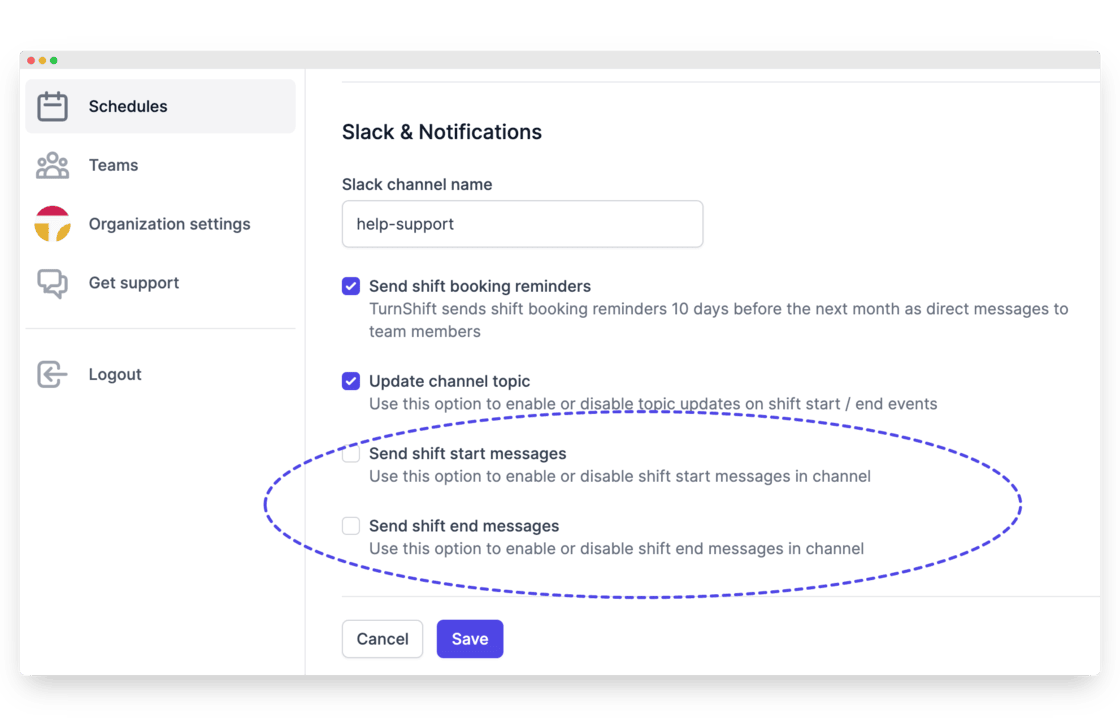
    Hey there, you can now enable or disable shift start/end channel messages for each schedule.

    You can configure this here:

    Shift start and end channel messages settings

    As a reminder, you can also enable / disable shift start / end topic updates.

    See ya!

  13. We're now sending your next week shifts on Friday

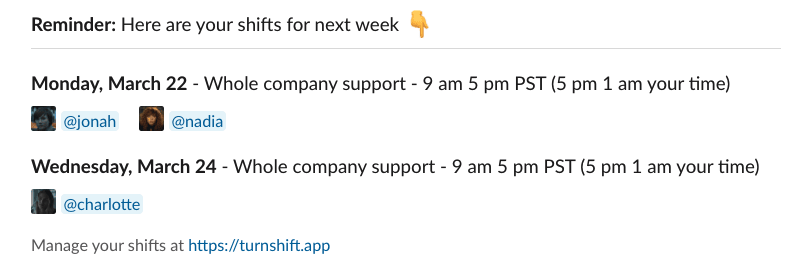
    Hi there, starting from today, every Friday at 11:45 am your time zone, the TurnShift bot will send you a direct message on Slack that summarizes your next week's bookings if any.

    And it looks like this:

    Friday direct message listing next week's shifts

    Hope you like it!

  14. Next day booking notifications are sent at the right time

    Hi there, before this update next day booking notifications were sent at 1:45pm (shift time). So if your shift time zone is Paris then it would be sent at 1:45pm Paris time.

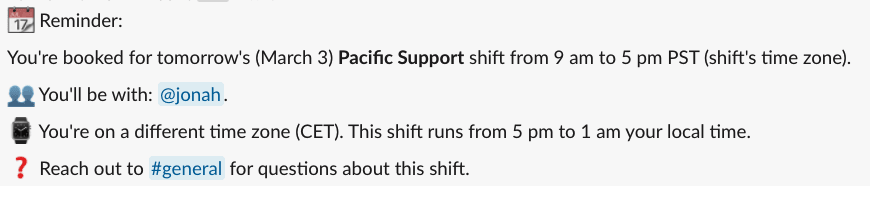
    We changed that and now we use the assignee's time zone (that we get from Slack) to send notifications for any next day bookings at 11:45am every day.

    We also show any time zone difference between you and the shift time zone, along with the exact date.

    Next day booking notification in Slack, with the time zone difference

  15. January / February update

    👋 Hi there!

    We've been busy piling up new features and fixes. Here's a summary of all the recent changes:

    7/7 support

    You can now activate Saturday and Sunday as shift days. Previously this was not feasible, mostly because our first users were not working through the weekends. Head over to your schedule settings to configure it.

    Adjust the number of shifts per day

    You can now adjust the number of shifts for each day of the week. This is particularly useful when:

    • you want to do 7/7 days support (activate Saturday and Sunday)
    • you have regular busier days (Monday!)
    • you have regular quieter days (Friday?)

    Access this feature on the scheduling settings screen:

    Adjust the number of shifts for a particular date

    You can now override the number of shifts for a particular date. This is useful when you exceptionally need more people (black Friday) or fewer/no people at all (company holidays).

    Here's how to do it:

    Limit the maximum number of shifts assigned to team members

    By default, TurnShift computes a booking plan automatically. This is handy because you don't have to manually calculate the number of shifts to book per assignee.

    But there are cases where you absolutely don't want people to be tasked with more than one shift (or more) per month. You can now configure that in the schedule settings:

    Other changes:

    • mobile rendering is now good enough in most places, allowing you to administrate schedules and book shifts on the run
    • booking plans are now always up to date, reflecting changes in schedule settings, number of shifts, teams, and team members
    • fixed a bug where we would send "You have to book undefined shifts this month" 😹
    • added a "There's a new version of TurnShift" banner for people keeping a tab open on TurnShift (you know who you are)

    On the tech side

    • we upgraded all of our dependencies
    • we now build for es6 browsers only (bye-bye IE11)
    • we added sentry alerts everywhere
    • we moved to Node 14.x
    • we moved to Next.js latest version

    🙌 Happy scheduling

  16. View a Schedule Booking plan

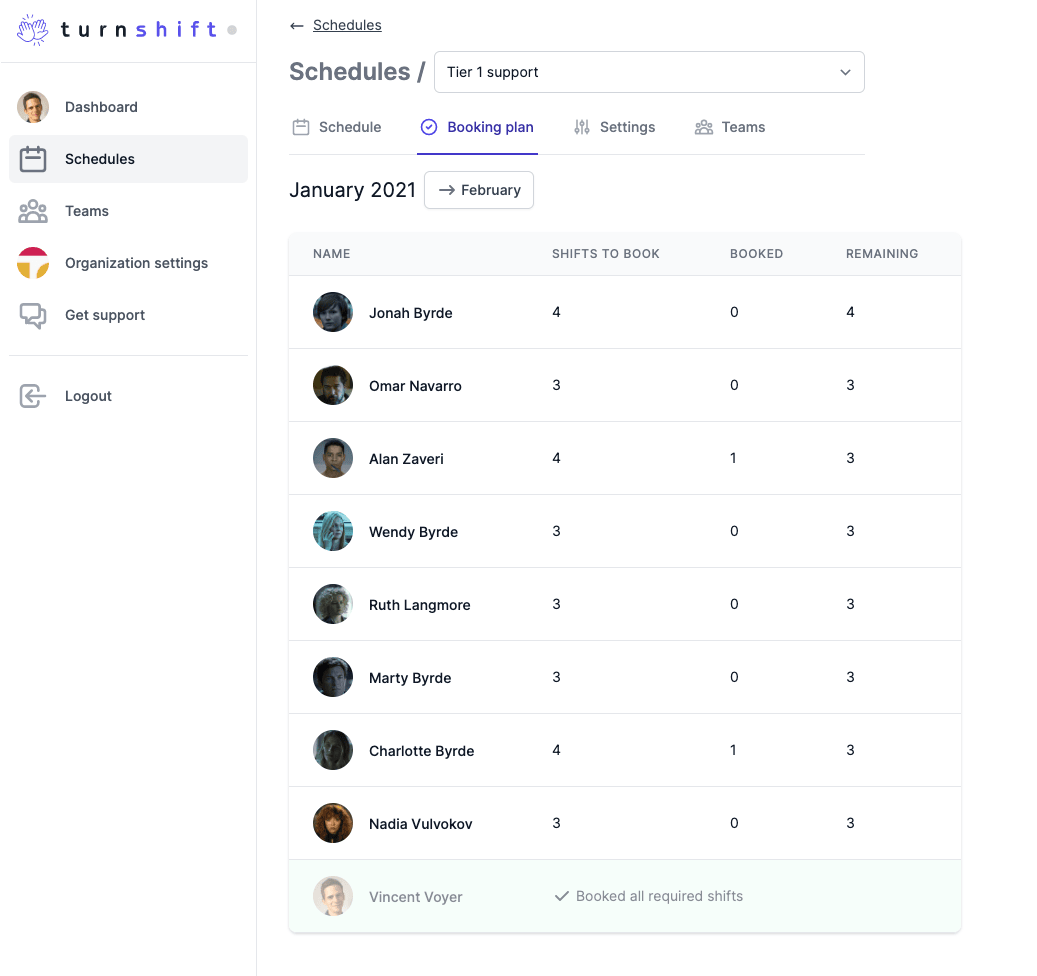
    You can now view the booking plan for a particular schedule. Get an overview of who booked all required shifts and who still needs to book some.

    A schedule's booking plan

    Have a great week!

  17. Channel Topic Updates, Privacy, and Pricing

    🪄 Channel topic updates

    We now update channel topics with who's on shift at the moment and if the shift is currently running. This helps people just coming to the channel understand who they can ping.

    We then update the topic when the shift ends and inform who will be on shift next, super handy.

    When the shift starts: Slack channel topic updated by TurnShift when a shift starts

    When the shift ends: Slack channel topic updated by TurnShift when a shift ends

    ⚠️ You need to accept new Slack permissions (set topic of public channels) for this new feature to work. You can do so on your TurnShift dashboard > organization settings.

    🔐 Privacy: We no more need to know about your channel names

    TurnShift being a Slack application and Slack being an important part of your work, we aim at limiting our access to your Slack data.

    To this goal, we updated our Slack syncing process to avoid syncing slack channel names. Many Slack organizations are creating channels like #cust-$companyUnderNda to talk about their customers. We initially synced those channel names to provide you a channel name search and select on the schedule page.

    We choose to enhance your privacy over a slightly better UI.

    Here's what TurnShift accesses and sometimes caches from your Slack organization:

    • user id, name, email, avatar URL; (i.e., your employees). Users from shared channels and guest users are not synced (usually not your employees)
    • public channel ids
    • sending messages to public channels
    • updating topics on public channels

    And that's it. We still can't and won't read your Slack messages

    💸 Pricing

    Our new pricing is as follow:

    • monthly payment: €4.20 / user / month
    • yearly payment: €3.50 / user / month (€42 / year). That's two months free per user.

    A user is someone you added to one or multiple teams, linked to active schedules.

    These were our prices in December 2020. Today's prices are on the pricing page.

    ⛑️ Support

    • You can now access our support chat (Crisp) from the main navigation ("Get support"), and we link your Crisp identity to your TurnShift account, so we know who we're talking to.
    • We can now personify your account after your approval to better help you out.

    🐞🔨 Bugfixes

    • ✅ Lowering the number of required people for a schedule breaks the page
    • ✅ Big channel lists break the page

    🤓 Tech

    • We moved to Tailwind v2 and Next.js 10: all good.
    • We started using TypeScript
    • We've added automatic integration testing using Checkly: it's awesome :)
    • We now have a way to add or remove Slack permissions and letting you know about them in the Organization settings, see:
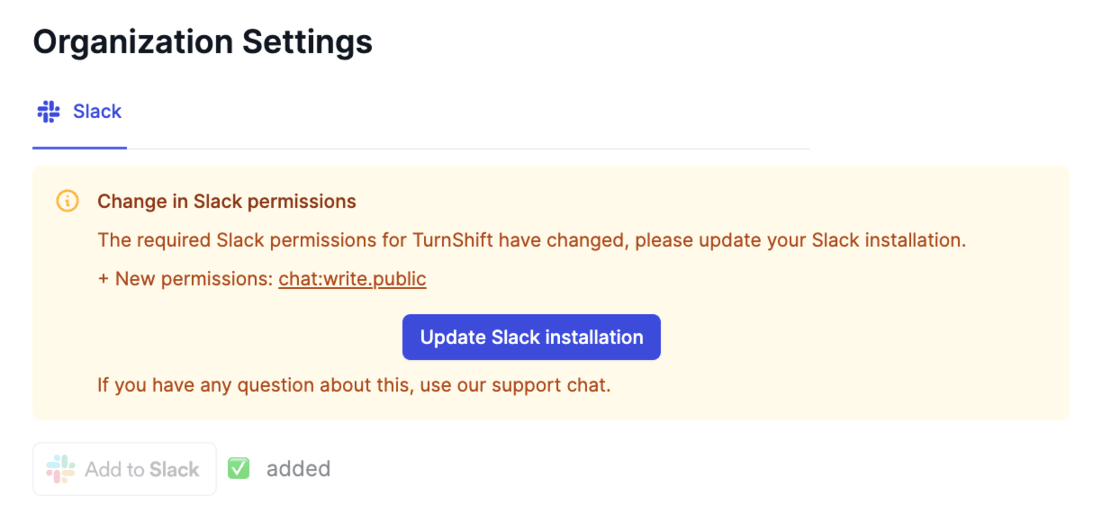
    Slack permissions listed in the organization settings

    That's it for today!

    Enjoy your holidays, if any, otherwise enjoy this cat gif:
  18. November 5 2020

    • ✅ You can now disable shift booking reminder notifications. This setting helps if all you want is manual scheduling with shift start/end notifications in Slack.

    You can find this setting in Schedules > choose a schedule > Settings > Checkbox named "Send shift booking reminders"

    • ✅ Bigger avatars in teams lists
    • ✅ Provide UI guidance when shifts are not active or no teams are assigned to them
  19. Shift => Schedule, better Slack sync

    Hi there,

    1. We renamed Shifts to Schedules on the UI so it's easier to understand. You're creating schedules, not shifts. And then team members are booking shifts inside those schedules.

    2. We no longer sync your Slack guest users, because most of the time you don't want it. If you would want them back just send me an email to support@turnshift.app or use the in-app chatbox.

    See ya!

  20. Better onboarding, support and shift end notification

    Hi there :) Here are today's updates:

    • We added a changelog
    • We added an explanation on why we need you to add the Slack application.

    "Login with Slack" (homepage) allows us to know who you are and log you back in. "Add to Slack" (org settings) allows TurnShift to sync channels, users and send messages.

    • Better onboarding: we now redirect you to organization settings by default if you haven't linked your Slack application
    • Support: You can now reach us via support@turnshift.app or using the in-app widget (bottom right, my picture basically)
    • Added shift end notifications:

    Shift end notification in Slack

    Enjoy!