Automatic rotations now available
You can now let your team take turns on a schedule, a day, a week or two weeks each, and TurnShift fills every day for you instead of you assigning people by hand each month.
To start one, open a schedule's settings, go to People and pick Automatic assignments. Everyone on the schedule's teams is listed: drag them into the order you want and pick the day the first turn starts. The rotation keeps going until you switch back to Manual assignments, and you can still assign someone by hand on any day.
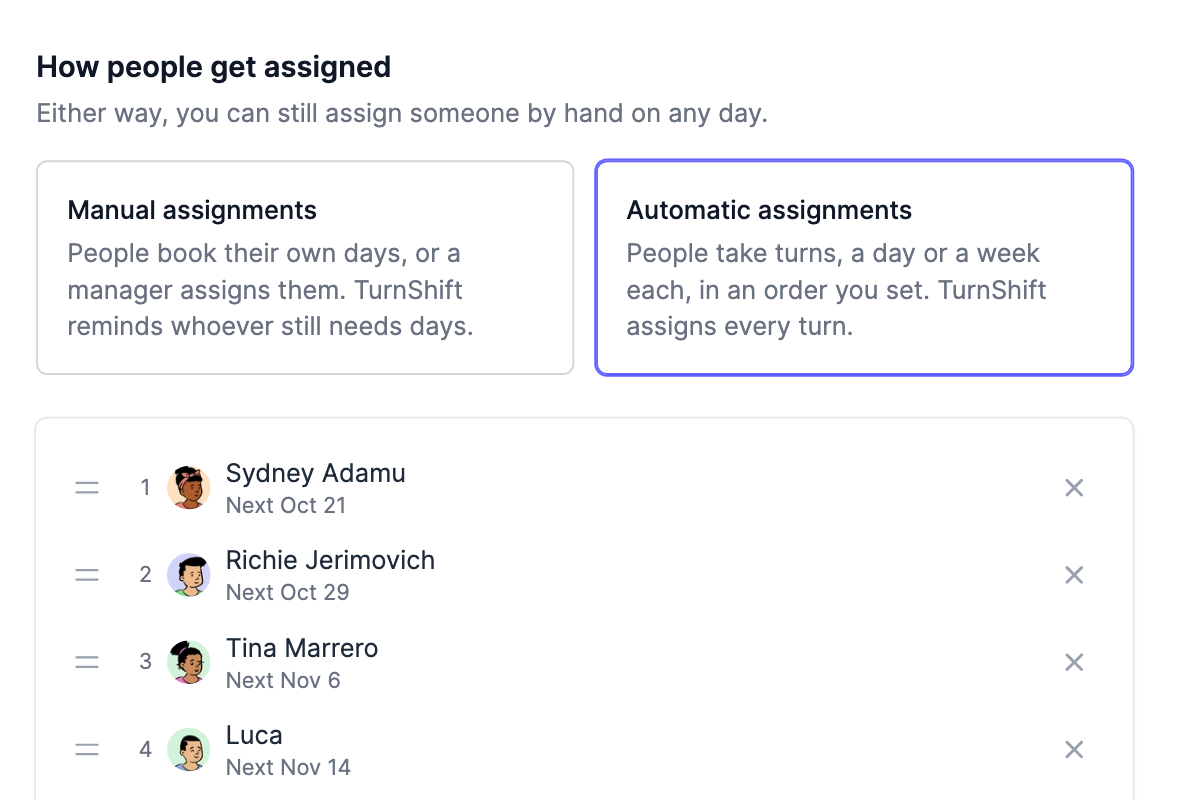
Changing the rotation never moves a turn people already planned around. When you add or remove someone, the change starts once everyone has had their current turn. To bring a new person in sooner, pick "Next turn": TurnShift shows who moves back one turn. When someone leaves, their turns stay open and TurnShift suggests who could cover them. You decide, and only the people whose next turn changes get a Slack message.
- Replace someone for one turn from the list of coming turns. Nobody else moves.
- Everyone sees how many days each person did, who is next, and every change made to the rotation.
- A turn can put several people on at once, so "2 of us every week" works too.
- Your existing schedules stay on manual assignments until you switch one.
We also cleaned up a schedule's settings. Coverage now holds what needs covering: the days, the hours and the time zone. People holds who covers it. And people can now book as far ahead as they want.
Hope you like it!